


Ordox · Service Management Platform
End-to-end service management for manufacturers, service networks and end customers
From the service call to the field service form, from spare part orders to settlements, from the loyalty program to multi-brand and multi-language support: the whole service operation on a single platform.
 Ordox
Ordox- Service Calls
- Customers
- Service Centers
- Devices
- Orders
- Products
- Warehouse
- Settlements
- Loyalty
They run their service networks on Ordox
 Combi boilers and heating · Türkiye, Uzbekistan
 Circulation pumps · Türkiye
Modules
Start with the module you need
Ordox is modular. You can start with service call management alone and enable other modules as your service network grows.
Service Call Management
Opening calls, request queue, assignment, appointments and status tracking. Head office and the field see the same screen.
Field Service Form
A guided flow that records labor, parts, photos, fault and solution, and both signatures digitally.
Device and Warranty
Device records by serial number, automatic warranty calculation, service history, shipment and installation tracking.
Spare Parts and Orders
Parts catalog, cart-based ordering, warehouse status, automatic stock deduction and delivery tracking.
Settlements
Service centers’ earnings are calculated automatically from completed work orders, with an approval flow and periodic reporting.
Loyalty Program
Dealer management, campaigns, points, reward shop and announcements. Grow your channel network with loyalty.
Authorized Service Network
Service centers, regions and technicians are defined in a hierarchy; calls are routed to the right service automatically.
Product Catalog and Knowledge Base
Brands, models, spare parts, fault codes and suggested solutions are managed from a single place.
Pricing and System Settings
Labor, parts and warranty tariffs, call types and currencies are defined centrally.
Roles and Permissions
Permissions per page and per action. Who did what is logged per user.
Reports and Dashboards
Follow the operation by your own metrics with the report designer and dashboards.
Field Sales and CRM
Prospective dealers, projects and service centers; visit tracking on the map.
Service call management and operations center
Call queue, assignment, appointments and status tracking from a single panel
The call list is filtered by status; the whole flow, from search to assignment and from assignment to appointment, is managed on the same page. The call detail shows customer data, device information, past notes and process steps in chronological order.
- Automatic routing The call goes to the right service based on the customer’s address and the region definitions.
- Appointment management Date and time planned around the customer’s request.
- Instant notification A new assignment reaches the technician’s phone.
- Process history Every note and stage on the call in a single timeline.
Ordox- Service Calls
- Customers
- Service Centers
- Devices
- Orders
- Products
- Warehouse
- Settlements
- Loyalty
Customer channel
Let customers open service requests themselves, on your website
With a guided form embedded in your brand’s website, customers submit requests and complaints in a few steps. Requests land directly in the request queue in Ordox, so your call center does not have to collect the same information again by phone.
- Request type A visual card flow with options such as fault or commissioning.
- Device and serial number check Warranty status appears on screen as soon as the details are entered.
- Fault catalog The customer picks the problem from a predefined list.
- Photos and video Evidence is attached to the request.
- Phone verification Contact details verified with an SMS code.
- 1Request
- 2Device
- 3Address
- 4Confirm
Mobile field service form
A digital, evidence-backed record of every visit
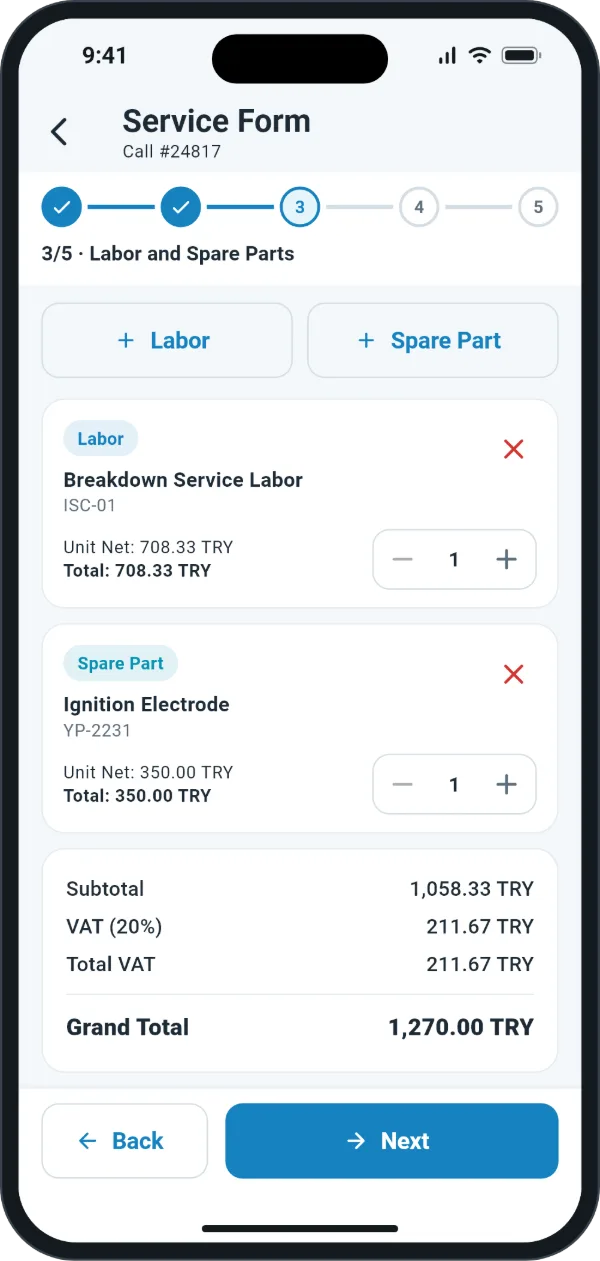
The service form is the official record of the work done on site. The guided structure keeps the technician from getting lost and focused on the right information at each step. The moment the form is closed, the service record, the parts movement and the settlement line are posted automatically.
- Barcode and serial number The device is scanned with the camera and warranty status appears instantly.
- Labor and parts Chosen from predefined labor items and the parts catalog, with automatic stock deduction.
- Visual evidence Photos of the old part, the work done and the result are attached to the form.
- Fault and solution The fault code shown by the device and the solution applied are recorded.
- Both signatures The technician signs first, then the customer signs on screen; the form is shared as a PDF.
Device and warranty management
Every device traceable from the production line to the end customer
Each device enters Ordox with a unique serial number; production, shipment, installation, service visits and replaced parts are kept in one chain of records. The system calculates the warranty automatically from the production and installation dates.
- Bulk import Devices from the production line are imported in bulk from Excel.
- Shipment and installation Shipment to the dealer and installation at the customer are both recorded.
- Lookup by serial number Service centers, customers and the manufacturer can look up devices within their permissions.
- Service history All visits, replaced parts and fault codes for the device are listed.
- Model
- Combi Boiler 24 kW
- Installation date
- 14 Mar 2025
- Warranty ends
- 14 Mar 2028
- Commissioning14 Mar 2025
- Periodic maintenance2 Apr 2026
Spare parts and orders
One line from the service center’s part request to warehouse delivery
The service center browses the parts catalog in the panel, adds what it needs to the cart and confirms the order. The order moves through the central warehouse with status labels and is updated in the service center’s panel.
- Easy search Find parts by code, name or device model.
- Status tracking Awaiting Approval, Preparing, In Transit, Delivered.
- Automatic stock deduction A part added to the service form is deducted from stock.
- Order history Search by date and order number.
3 items · NTC sensor, expansion vessel, three-way valve
- Ordered by
- Kadıköy Authorized Service
- Order date
- 12 Sep 2026
- Awaiting Approval
- Preparing
- In Transit
- Delivered
Settlement management
Completed work orders turn into financial records automatically
The signed service form is calculated against the defined labor and parts price lists, and settlement lines are created automatically. The manufacturer filters statements by period and manages the approval flow, while the service center follows its own settlement list transparently.
- Automatic settlement The settlement line is created as soon as the form is closed.
- Period statements Reporting by date range, service center and manufacturer.
- Approval flow Manufacturer review with approve and reject steps.
- Transparent tracking The service center can see what it has earned at any time.
- Completed work orders
- 128
- Labor
- $9,640.00
- Spare parts
- $4,125.00
Ordox mobile app
The technician’s whole job in their pocket
The Ordox mobile app for Android and iOS brings together everything technicians and service managers do in the field. The app can be fully customized for your company, from your logo and colors to its screens.
- All calls on one screen Service calls with status labels, filters and search.
- My Tasks Technicians see only the jobs assigned to them.
- Warranty lookup by serial number The barcode is scanned with the camera; warranty and ownership details appear instantly.
- Service form completed on site Labor, parts, photos and both signatures; the form is shared as a PDF.
- In five languages Turkish, English, Russian, Uzbek and Persian.
- Built for your company Logo, colors and screens are fully customized for your company.


Infrastructure
The same infrastructure at home and abroad
Interface in 5 languages
Turkish, English, Russian, Uzbek and Persian. Right-to-left writing is supported.
Multi-currency
Market-specific price lists in TRY, USD, EUR and UZS.
Dedicated installation
A separate installation and a separate database for each company. Your data never shares a database with other companies.
Mobile app
Android and iOS app, fully customizable for your company.
SMS notifications
The customer receives an update message as the service call progresses.
Multi-brand
An organization’s different brands and product groups are managed on the same platform.
A loyalty app for your dealers, under your own brand
Device registration by barcode, points, a reward shop and announcements on your dealer’s phone.
Explore the loyalty appComplete your call center with OrdoxAI
The AI assistant recognizes the caller, diagnoses the fault code and opens the service call in Ordox.
Explore OrdoxAIFrequently asked questions
Who is Ordox for?
It suits every product whose after-sales service is managed through an authorized service network. It can be used for any product group serviced by authorized service centers, such as combi boilers and heating, air conditioning and home appliances.
Do I have to take all the modules?
No. The structure is modular: you can start with service call management alone, or with the loyalty program alone, and enable other modules when you need them.
How is Ordox priced?
Pricing is based on the number of users and user types. We prepare a tailored quote based on the structure of your service network; just request a demo.
Can our customers open service requests themselves?
Yes. With the service request form embedded in your website, the customer submits a fault or commissioning request in a few steps, and it lands directly in the request queue.
How do technicians use it in the field?
With the Ordox mobile app for Android and iOS. Technicians see the calls assigned to them, scan the serial number with the camera to check warranty status, fill in the service form, collect the customer’s signature on screen and share the form as a PDF. The app can be fully customized for your company.
Which languages and currencies does it support?
The interface is available in Turkish, English, Russian, Uzbek and Persian. Price lists can be defined in different currencies such as TRY, USD, EUR and UZS.
Can we migrate our existing data to Ordox?
Yes. Customer, device and product records from your current system can be migrated to Ordox; bulk data such as device lists can also be imported from Excel.
Does it integrate with our ERP or accounting system?
All of Ordox runs on an API. We work with you on integrating it with your ERP or accounting system, based on your needs.
Is our data kept separate from other companies?
Yes. A separate installation and a separate database are set up for each company; your data is never stored in the same database as another company’s. Your data is also backed up to a separate storage location every 3 hours.
See a live demo built around your own processes
Let’s map Ordox and OrdoxAI to your workflow and walk through them together.